In this lesson, you will learn what each operator block does.
The operator blocks are the ones colored in green. Let’s learn what each block does.
The addition block
The addition block has two empty blanks and a plus sign in the middle. Add a number in the first blank and another in the second blank to try it out. Click on it to see the answer in a speech bubble.

The subtraction block
The addition block has two empty blanks and a minus sign in the middle. Add a number in the first blank and another in the second blank to try it out. Click on it to see the answer in a speech bubble.

The multiplication block
The multiplication block has two empty blanks and an asterisk sign in the middle. Add a number in the first blank and another in the second blank to try it out. Click on it to see the answer in a speech bubble.

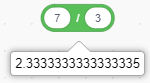
The division block
The division block has two empty blanks and an asterisk sign in the middle. Add a number in the first blank and another in the second blank to try it out. Click on it to see the answer in a speech bubble.
The “pick random 1 to 10” block
The “pick random 1 to 10” block picks a random integer within the specified range. You can change the 1 and 10 to any numbers you want.

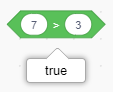
The greater than block
The greater than block has two empty blanks and a greater than sign in the middle. Add a number in the first blank and another in the second blank to try it out. Click on it to see the answer in a speech bubble which is true or false.
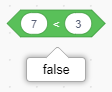
The less than block
The less than block has two empty blanks and a less than sign in the middle. Add a number in the first blank and another in the second blank to try it out. Click on it to see the answer in a speech bubble which is true or false.
The equals block
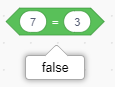
The equals block has two empty blanks and an equals sign in the middle. Add a number in the first blank and another in the second blank to try it out. Click on it to see the answer in a speech bubble which is true or false.
The “and” block
The “and” block reports true if both conditions are true.

The “or” block
The “or” block reports true if one of the conditions is true.

The “not” block
The “not” block reports true if the condition is false and reports false if the condition is true.

The “join” block
The “join” block joins text and numbers, but doesn’t add them. You can put words and numbers instead of the two words in the blanks.

The “letter 1 of apple” block
The “letter 1 of apple” block reports the specified letter at the specified position in a word or string. You can change the word to any word you like and the number to any number you like.

The “length of apple” block
The “length of apple” block reports the numbers of letters in a word or string. You can change the word apple to anything you want.

The “apple contains a?” block
The “apple contains a?” block reports true if the specified word contains the specified letter. You can change the word and letter to any word and letter you like.

The “mod” block
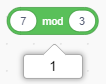
The “mod” block reports remainder from the division of first number by second number.
The “round” block
The “round” block turns a decimal into the nearest whole number.

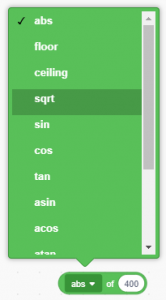
The “abs of” block
The “abs of” block computes a function. Choose different functions from the drop-down menu.